Global Payment

SaaS Virtual Cards: How Businesses Can Manage Software Subscription Spend

Emily Carter
Business Finance Writer

Stop SaaS subscriptions from quietly draining budget. See how SaaS virtual cards cap spend, lock vendors, and tame recurring USD software payments.

2026.09.09 11:06:51 · 6minute(s)

Key Takeaways

  • SaaS spend is large and largely automatic: industry benchmarks put it at roughly US$10,000 per employee per year, with 25–30% of licenses unused or underutilized (Zylo) — and most SaaS contracts auto-renew, charging the card on file without anyone approving the renewal.
  • SaaS virtual cards are built for recurring software and subscription payments — dedicated cards per vendor, per team, or per budget owner.
  • Spending limits, freeze controls, and transaction monitoring reduce unauthorized purchases, silent renewals, and budget overruns.
  • Canadian businesses should weigh USD billing, FX costs, and expense reconciliation when choosing a provider for international SaaS vendors.
Businesses increasingly run on SaaS — operations, marketing, finance, HR, analytics, and collaboration all live in subscriptions. As the stack grows, the billing side compounds: multiple recurring payments landing on shared cards, employees buying software independently, expired cards breaking critical tools mid-quarter, duplicate subscriptions, unused seats, surprise price increases, and foreign currency charges on vendors that bill in USD.
SaaS virtual cards address the billing layer of that problem: digital cards dedicated to software subscriptions, scoped per vendor or team, with limits and records attached from the first charge.
This guide explains how SaaS virtual cards work, how businesses deploy them, and what Canadian companies should weigh when paying international SaaS vendors.

What Is a SaaS Virtual Card?

A SaaS virtual card is a virtual business card used specifically for software subscriptions and recurring SaaS payments — issued digitally, dedicated to the software budget, and separated from general corporate spending.
The vendors it typically fronts are the ones a modern stack runs on: collaboration tools like Slack and Google Workspace, creative suites like Adobe, platforms like Notion and HubSpot, enterprise systems like Salesforce, cloud infrastructure like AWS, and AI tools like OpenAI — plus whatever the next vendor is.
The point is not to catalogue software. It is that every one of these vendors bills the same way: automatically, on a card, usually monthly, increasingly in USD — which makes the card the control point for the entire category.

Why Use Virtual Cards for SaaS Subscriptions?

  • Centralize subscription payments — all software charges land on cards issued for software, so the category is visible as a line of spending rather than scattered across statements.
  • Separate vendors by card — each vendor's charges arrive on their own card, so an upgrade, a price increase, or a duplicate seat is identifiable the moment it bills.
  • Control recurring charges — limits cap what auto-renewals and per-seat expansions can charge without intervention.
  • Reduce unauthorized spending — merchant restrictions and approval workflows keep employee software purchases inside a policy instead of inside a surprise.
  • Simplify employee software purchases — teams get cards with budgets rather than reimbursement requests, and finance sees the spend in real time.
  • Improve subscription visibility — the card structure itself becomes the inventory: one card per tool is a live record of what the company pays for.

How SaaS Virtual Cards Work

Create Card → Assign SaaS Vendor → Set Limit → Subscription Charges → Monitor → Reconcile
Step 1 — Create a vendor-specific card. Issue a card per SaaS vendor — or per team or budget owner — from the provider's platform.
Step 2 — Set spending limits. Cap the card at the subscription's expected cost, or at the budget if the card covers several tools.
Step 3 — Connect the card to the subscription. Replace the shared corporate card in the vendor's billing settings — the point where the subscription becomes controlled.
Step 4 — Monitor recurring transactions. Charges land on schedule; real-time records show each vendor's billing as it happens, flagging renewals and increases on arrival.
Step 5 — Cancel or freeze the card when needed. Offboarding a tool or an employee? Freezing the card stops future charges instantly — no dependence on the vendor's cancellation flow.

SaaS Virtual Card vs Traditional Corporate Card

Feature
SaaS Virtual Card
Traditional Corporate Card
Subscription management
Strong
Basic
Vendor-specific cards
Strong
Limited
Spending controls
Strong
Available
Online payments
Excellent
Excellent
Recurring payments
Excellent
Excellent
Employee software spend
Easy to control
More difficult
Security
Better separation
Primary card exposure

PhotonPay: Virtual Cards for SaaS Spend

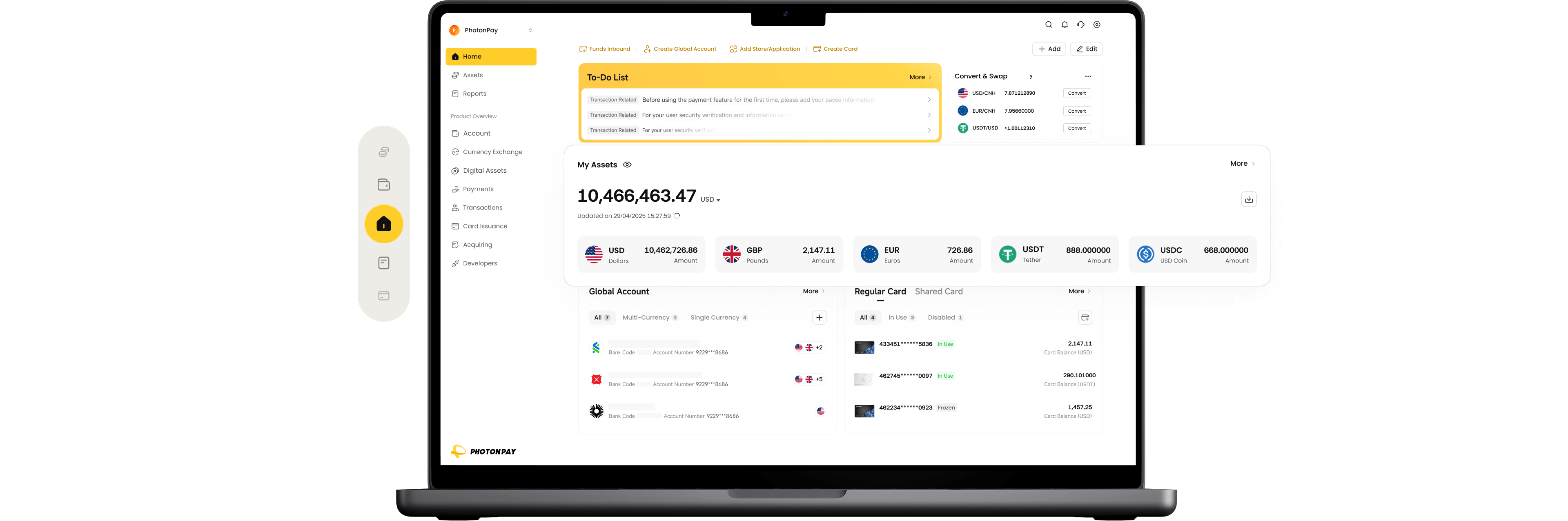
For businesses that want the workflow in one place, PhotonPay runs Funding → Virtual Card → SaaS Spend → FX → Expense Tracking → Reconciliation from a single platform. Its multi-asset wallet funds virtual cards from CAD, USD, or stablecoin balances such as USDC or USDT, so a Canadian team can hold USD against USD-billing vendors and convert on its own schedule.
register with photonpay
  • Built for SaaS vendors — subscriptions each on their own scoped card, so duplicate seats and silent upgrades surface at the card level.
  • Spending controls and freeze — per-card limits and instant freeze mechanics contain unauthorized or duplicate spend.
  • USD holding — hold USD against USD-billing vendors, so conversion happens on the business's schedule, not per charge.
  • Accounting-ready records — transaction records and data that reach the ledger with vendor, card, and cost centre attached.
  • Regulated and documented — as a payment operating system registered with FINTRAC as a money services business, PhotonPay covers the funding, FX, and spend layers together rather than as separate stitched providers.

How Businesses Can Use Virtual Cards to Manage SaaS Spend

One Card Per SaaS Vendor

The foundational pattern: a dedicated card for each tool. The vendor's entire billing history — base subscription, per-seat growth, price increases — lives on one card, so reviewing what a tool really costs is reading one statement, and cancelling is freezing one card.

One Card Per Department

Where per-vendor granularity is too much, issue cards per department: marketing's tools on one card, engineering's on another. Budgets map to cards, and departmental software spend is visible without expense-code archaeology — the card statement answers "what did this team buy this month" before anyone opens a report.

One Card Per Employee

For teams that buy software often, a per-employee card with a budget turns software purchasing into a self-serve allowance — employees move fast, finance keeps the ceiling, and every purchase is pre-attributed to its owner.

Temporary Cards for Software Trials

Trials that require a card are the classic silent-conversion trap: the trial ends, the paid subscription begins, and nobody notices for months. A trial-specific card — frozen or expired the day the trial ends — makes silent conversion structurally impossible.

Cards With Spending Limits

Limits do the enforcement that policy documents cannot: a card capped at the subscription price cannot absorb a price increase without someone deciding to raise the cap. That single mechanic turns renewals into decisions.

Cards for USD-Denominated SaaS

Most major SaaS vendors bill in USD. A USD-denominated card funded on the business's schedule separates the FX decision from the billing cycle — conversion happens when it makes sense, not on every vendor's charge date.

SaaS Virtual Cards for Canadian Businesses

Canadian companies run a specific SaaS payment pattern:
  • US-based SaaS vendors — the majority of the stack bills from the US, so international acceptance and USD handling are first-order criteria.
  • USD subscriptions — vendors commonly price and bill in USD regardless of the customer's location.
  • CAD → USD conversion — the conversion happens somewhere; the question is whether it happens at a transparent, known cost or inside an opaque effective rate.
  • Foreign transaction fees — a percentage per charge on top of the spread, which scales directly with the size of the stack.
  • GST/HST records — Canadian record-keeping needs attributable software expenses; vendor-level cards do the attribution before accounting begins.
  • Centralized expense management — one view of software spend across cards, teams, and currencies.
Together these points describe a stack that is almost entirely USD-billed from US vendors, funded in CAD, and audited in a Canadian ledger — which is why the card provider's currency handling matters as much as its card features.

What Should Businesses Look for in a SaaS Virtual Card?

  • Vendor-specific cards — unlimited or high-volume issuance at no friction.
  • Recurring payment support — subscriptions that survive card updates without vendor support tickets.
  • Spending limits — per-card caps that enforce budgets structurally.
  • Freeze / cancel controls — instant stop, without depending on vendor cancellation flows.
  • USD support — spend and hold in USD against USD billing.
  • FX rates — a transparent spread on conversion, visible before it is paid.
  • Expense categorization — charges that carry vendor, team, and budget context natively.
  • Accounting integrations — card data flowing to the ledger without manual export.
  • Real-time transaction data — charge visibility on billing day, not at month-end.

How Much Can Businesses Save by Managing SaaS Spend?

The honest framing is a cost model, not a savings percentage:
SaaS Cost = Subscription Fees + FX Cost + Unused Subscriptions + Unauthorized Spend
Managed well, the last three terms shrink: duplicate subscriptions surface when two vendors bill two cards in the same category; unused tools surface when a card's charges continue with no corresponding usage; unnecessary upgrades surface as limit breaches instead of accepted charges; and FX costs shrink when conversion happens on the business's schedule rather than per billing event.
The context makes the stakes concrete: industry benchmarks put SaaS spend near US$10,000 per employee per year, with roughly a quarter or more of licenses unused — waste that lives in the billing layer this article is about, and Zylo estimates global unused-SaaS waste at around US$45 billion. A card program does not fix procurement discipline by itself, but it makes every dollar of it visible.

SaaS Virtual Cards vs Expense Management Software

SaaS Virtual Card
Expense Management Software
Pay SaaS
✓
Sometimes
Issue cards
✓
Often
Spending limits
✓
✓
Expense tracking
✓
✓
Subscription control
Strong
Strong
Accounting
Depends
Often strong
Payment execution
✓
Usually not core
The distinction: a virtual card controls the payment; expense software manages the workflow around it. Expense platforms categorize and approve what has already been charged; the card decides what can be charged. Most growing businesses end up using both — and the strongest setups connect them, so card-level data feeds the expense workflow automatically.

Conclusion

SaaS spend is recurring, automatic, and mostly invisible until something breaks — an expired card takes down a tool mid-quarter, a silent renewal buys a year of software nobody reviewed, and the stack's real cost emerges only when someone finally audits it. Virtual cards put controls where the charges actually happen: vendor-specific cards, hard limits, instant freeze, and a billing structure that doubles as a live inventory of the stack.
Start with the vendors that matter most — the ones with per-seat growth, auto-renewals, or USD billing — and let the pattern spread as the stack does. For Canadian businesses, choose on USD handling and FX transparency first; over a full software budget, those costs outweigh any card fee.

FAQs

What is a SaaS virtual card?

A SaaS virtual card is a virtual business card dedicated to software subscriptions and recurring SaaS payments — issued digitally, scoped to specific vendors, teams, or budgets, with spending limits and controls matched to how software actually bills: automatically and repeatedly.

Can virtual cards be used for recurring SaaS subscriptions?

Yes — recurring billing is the core use case. The card stays on file with the vendor, charges land on schedule, and limits plus real-time monitoring keep the subscription inside its budget. When a subscription ends, freezing the card stops future charges immediately.

Can I create one virtual card for each SaaS vendor?

Yes — per-vendor cards are the standard pattern. Each vendor's billing history lives on its own card, making costs, increases, and cancellations individually visible and controllable without affecting any other subscription.

Can Canadian businesses use virtual cards for US SaaS companies?

Yes — most major SaaS vendors are US-based and bill in USD, and virtual cards handle that billing with FX applied by the provider. The considerations that matter are USD support, the FX spread, foreign transaction fees, and the card network's acceptance with each vendor.

Power Your Global Growth with PhotonPay